Solutions

Put AI to work in your business without replacing what already works.

No rip-and-replace platform required.

We keep your existing systems of record and add only the connections, controls, approval paths, and workflow interfaces the selected process requires. Some responsibilities and operating steps may change; the goal is to improve the work without forcing a platform migration.

Follow the process

Sample workflows, see what is possible.

Explore three example workflows, then bring us a process of your own. Each pairs a business problem with a useful output and a clear place for your team to decide.

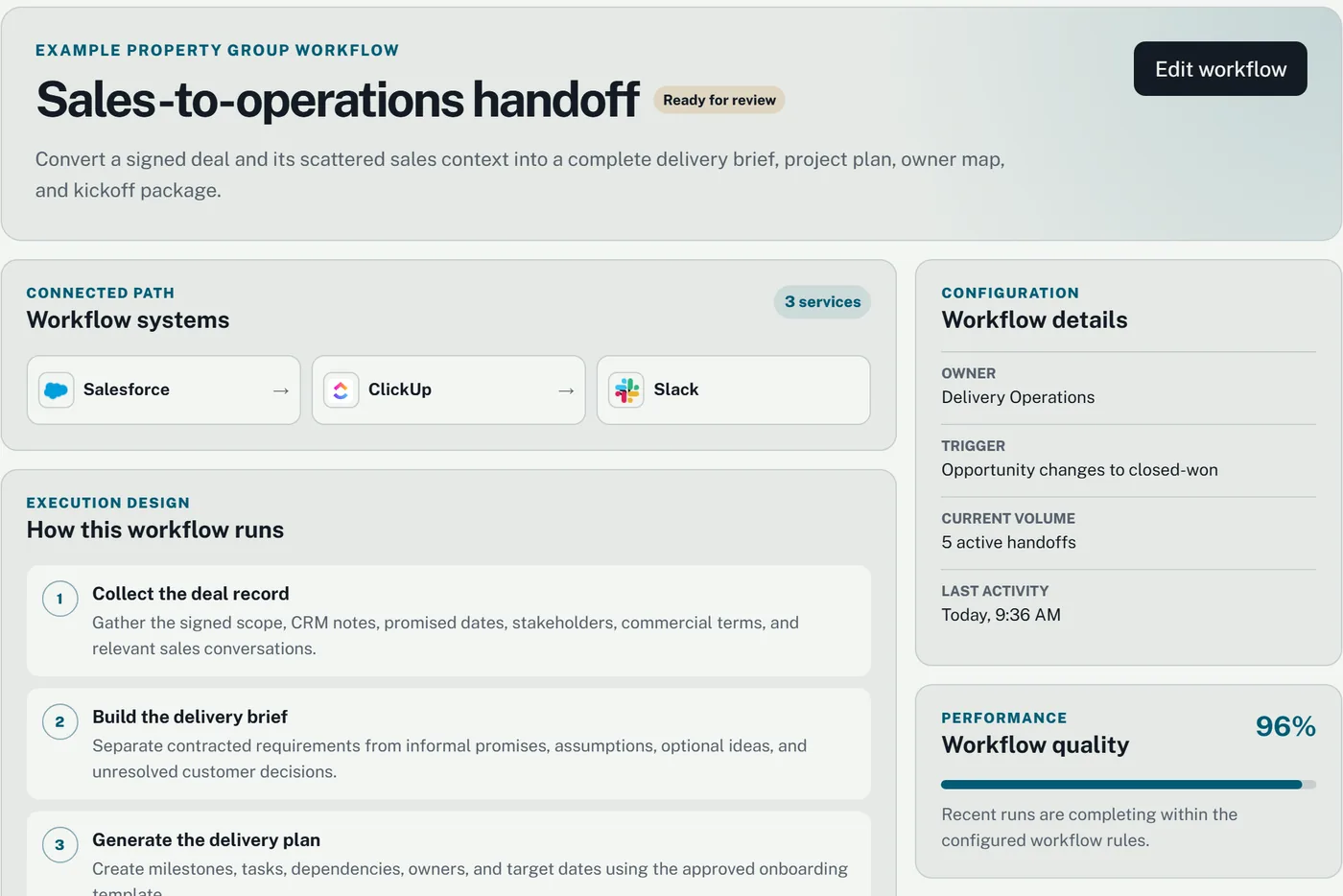
Sales-to-operations handoff in the demo workspaceView full screenshot of Sales-to-operations handoff (opens in a new tab)

Sales-to-operations handoff

The problem
A won deal reaches operations with missing details and unclear next steps.
What the workflow handles
Checks the handoff record, gathers context, and prepares tasks for the receiving team.
What your team receives
A checked handoff packet, assigned next steps, and a record of approved changes.
Where a person decides
The owner resolves missing details and approves changes outside the agreed rules.
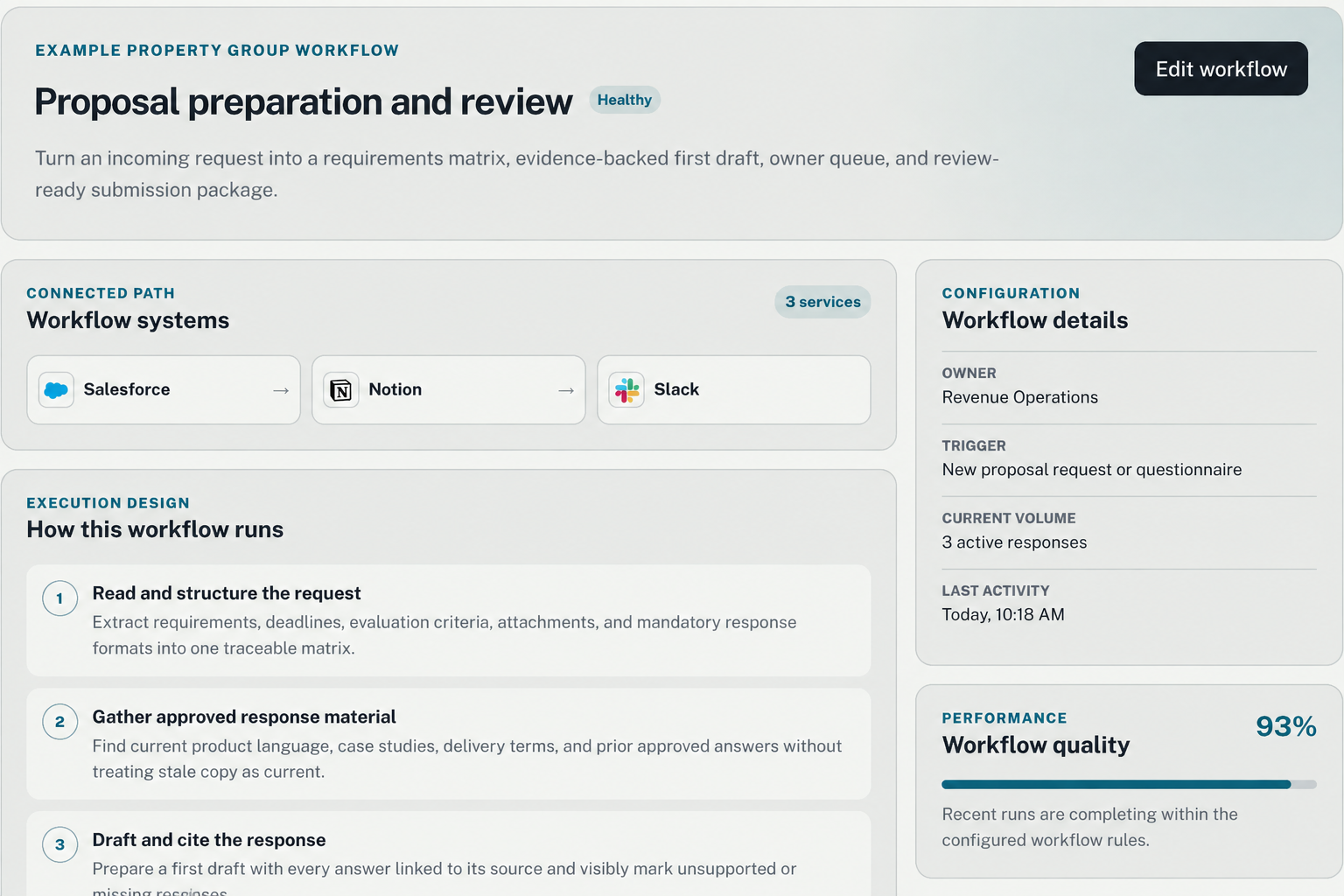
Proposal preparation and review in the demo workspaceView full screenshot of Proposal preparation and review (opens in a new tab)

Proposal preparation and review

The problem
Requirements, approved answers, and subject-matter expertise are scattered across systems.
What the workflow handles
Extracts requirements, gathers supporting material, and drafts responses with evidence.
What your team receives
A requirements matrix, first draft, and review queue for the submission package.
Where a person decides
Your team verifies claims, resolves gaps, and approves the final submission.
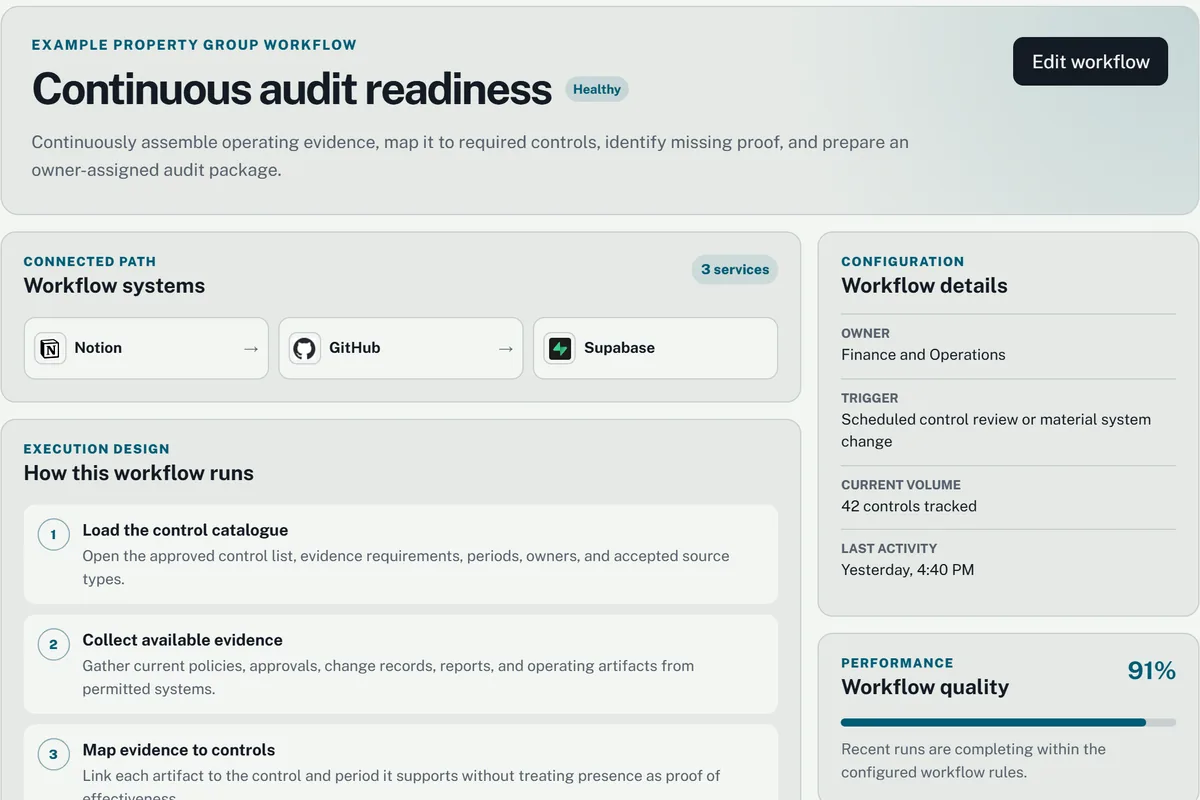
Continuous audit readiness in the demo workspaceView full screenshot of Continuous audit readiness (opens in a new tab)

Continuous audit readiness

The problem
Evidence is spread across teams and missing proof surfaces late in the audit process.
What the workflow handles
Organizes permitted evidence, maps it to controls, and flags gaps for owners.
What your team receives
An evidence package with sources, outstanding items, and accountable owners.
Where a person decides
Control owners validate the evidence and decide how gaps should be resolved.

Your workflow

Start with a recurring process that is slow, fragmented, or difficult to manage. We will work out the useful first step together.

Trigger
What starts the process?
Owner
Who is responsible for the result?
Connected services
Which tools hold the information?
Boundaries
What needs a person’s decision?

These four questions give us a starting point.

Bring us a workflow

Many recurring processes share these building blocks.

Read + extract

Turn documents, emails, and forms into structured, validated data.

Compare + reconcile

Match records across systems and surface what disagrees.

Classify + route

Recognize what a case is and send it to the right owner.

Prepare decisions

Gather scattered context into one reviewable proposal.

Follow up + coordinate

Carry the next step so people do not have to remember it.

Update systems

Post the approved result back to the source of record.

Defined, started, approved, recorded.

Follow a sales-to-operations handoff: a deal is ready, its record needs checking, and an operations owner decides what happens next.

  1. 01

    Defined before it runs

    A deal is ready to hand over. The workflow names the receiving owner, the details operations needs, and which systems can be updated. Missing information is flagged before anyone treats the handoff as complete.

    Second Mind workspace: the sales-to-operations handoff workflow detail with its connected services, the numbered steps of how it runs, owner, trigger, current volume, and recent quality. Demo workspace with sample data.
    Open screenshot at full size ↗
  2. 02

    Started from one place

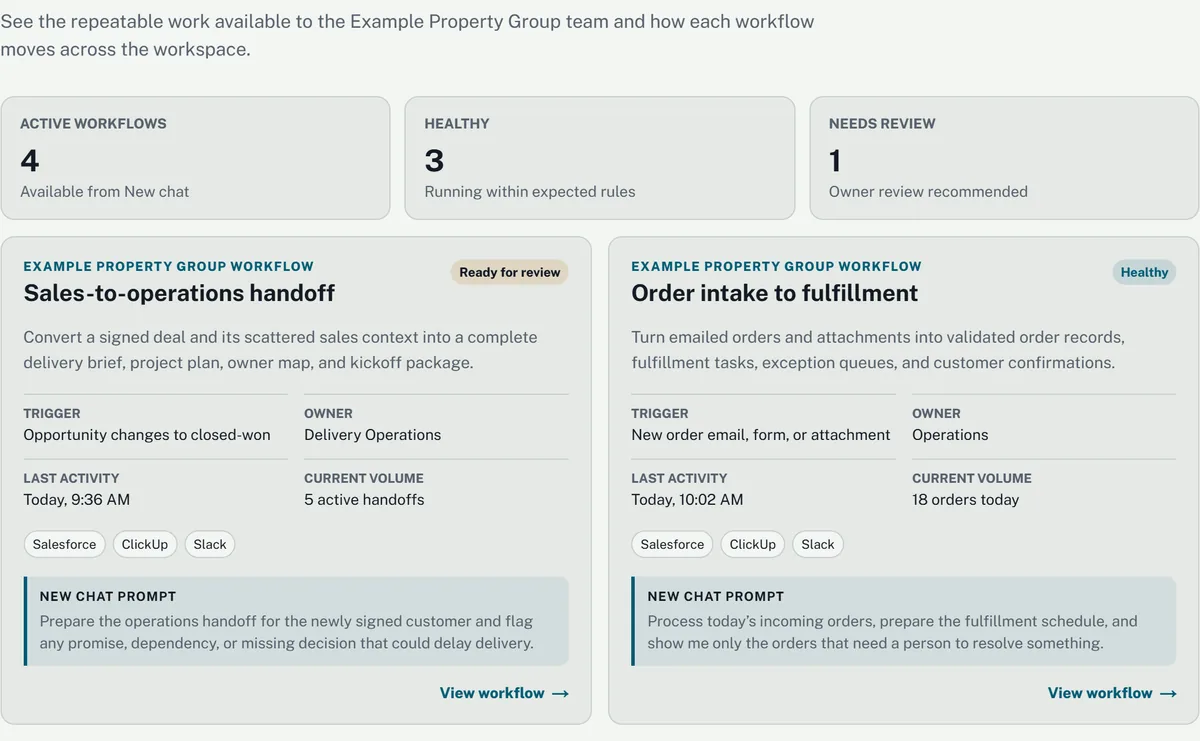
    The team starts the handoff from the catalogue. The workflow checks the deal record and brings the relevant context into one review, so operations does not have to reconstruct it across tabs.

    Second Mind workspace: the workflows catalogue with active, healthy, and needs-review counts and workflow cards showing trigger, owner, last activity, volume, and connected services. Demo workspace with sample data.
    Open screenshot at full size ↗
  3. 03

    A person approves what matters

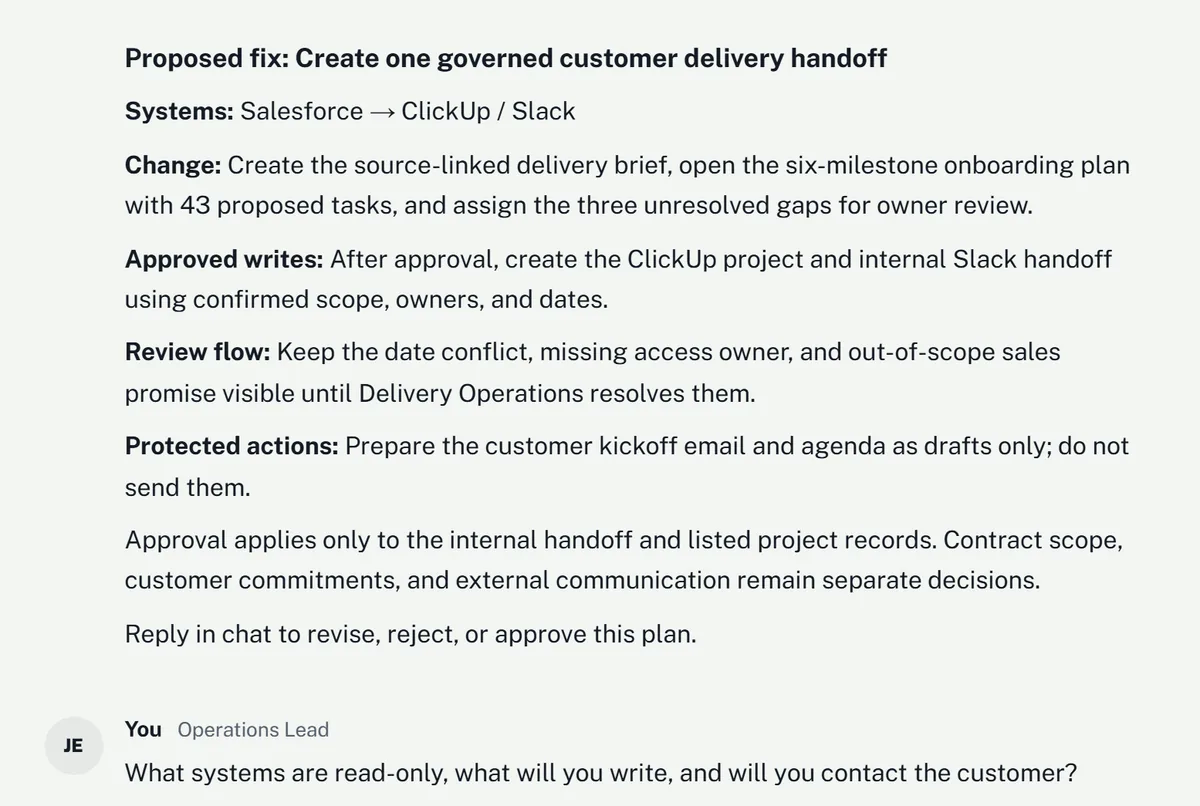
    If ownership or a required detail is unresolved, the workflow brings a proposed handoff to the owner. They see what it can change—and what needs their approval—then revise, reject, or approve the next step.

    Second Mind workspace conversation: a proposed fix listing systems, change, approved writes, review flow, and protected actions, ending with a request to revise, reject, or approve the plan, followed by the owner asking which systems are read-only. Demo workspace with sample data.
    Open screenshot at full size ↗
  4. 04

    Recorded and reconciled

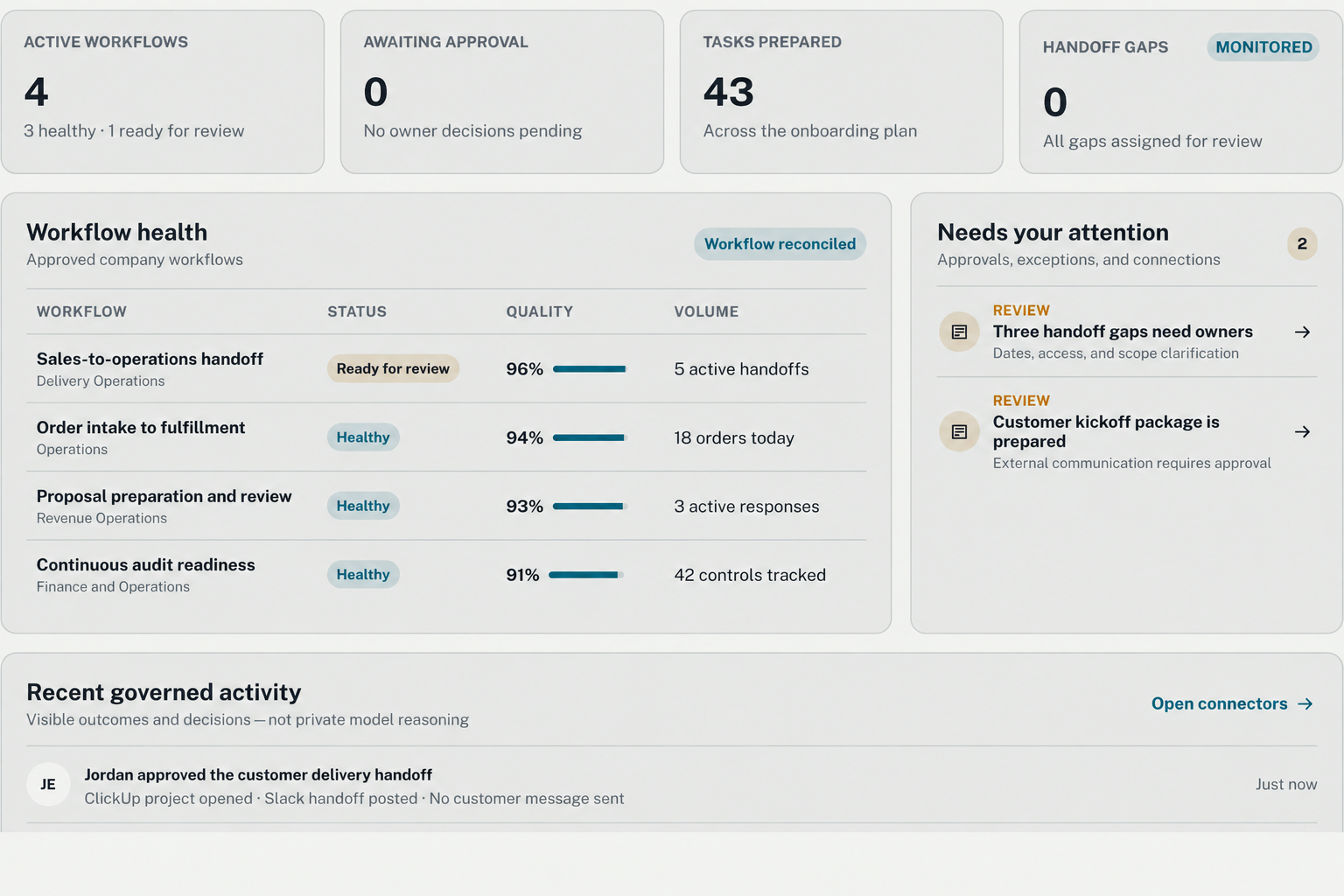
    The completed handoff records the owner’s decision and the changes made for this request. Operations can see the next steps and any remaining exceptions. Other outstanding workflows keep their own status.

    Second Mind workspace overview after the handoff: no items awaiting approval, no open handoff gaps, the workflow health table, items needing attention, and a governed activity entry recording that the owner approved the handoff and no customer message was sent. Demo workspace with sample data.
    Open screenshot at full size ↗

The process, in depth

From first conversation to ongoing operation.

Three connected stages move selected workflows from evidence to controlled production, then keep them working as the business changes. Open any step.

Stage 01Operational discovery
01DiscoverOperational discovery

Reconstruct the work from evidence.

We review the relevant interviews, documents, examples, rules, systems, volumes, exceptions, and baseline information needed to understand your business.

What happens

  • Interviews with the people who perform and own the work
  • Review of permitted records, examples, SOPs, and system evidence
  • Mapping of handoffs, exceptions, delays, and current controls

What you get

  • Evidence inventory
  • Current-state Workflow Map
  • Initial opportunity and risk assessment

Your team’s part Introduce the process owner and share permitted examples of the current process.

02ReviewOperational discovery

Validation before design.

We present the mapped processes, assumptions, pain points, risks, missing information, and ranked opportunities so our teams are aligned.

What happens

  • Workflow Map reviewed with your team
  • Rules, exceptions, assumptions, and risks challenged
  • Business case tested against your own numbers

What you get

  • A validated map
  • Confirmed rules and exceptions
  • A decision to proceed, revise, or stop

Gate: nothing advances without your approval.

Your team’s part Correct the map, challenge assumptions, and decide whether to proceed.
Stage 02Implementation and controlled launch
03DesignImplementation

Turn the opportunity into an explicit specification.

We define the workflow’s purpose, owner, trigger, inputs, outputs, AI tasks, fixed rules, approvals, permissions, exceptions, measures, rollback, and manual fallback.

What happens

  • Future-state workflow designed
  • Authority and autonomy boundaries set
  • Success and failure criteria agreed

What you get

  • Versioned Workflow Specification
  • Control and approval design
  • Implementation plan

Your team’s part Agree the rules, success measures, and decisions your team will retain.

04BuildImplementation

Turn the design into a working system.

We build the agents, integrations, rules, and interfaces required to run the process inside your existing tools.

What happens

  • AI tasks and deterministic controls implemented
  • Approvals, audit, and fallback paths built in
  • Customer logic kept visible and versioned

What you get

  • Working workflow system
  • Reviewable configuration
  • Controlled test environment

Your team’s part Review the working version and clarify business-specific questions.

05EvaluateImplementation

Confirm the system performs as intended.

We test the system against real examples, edge cases, and expected variations to verify reliable performance before launch.

What happens

  • Real examples and expected variations tested
  • Results reviewed and the system refined
  • Performance compared with agreed standards

What you get

  • Test results
  • Performance summary
  • Launch recommendation

Gate: launch moves forward once the agreed standards are met.

Your team’s part Review representative results and confirm that the agreed acceptance criteria are met.

06ConnectImplementation

Connect our system to yours.

We wire Second Mind into the tools and information your operation already uses, with scoped permissions, separate credentials, duplicate protection, and access managed by your team.

What happens

  • Existing tools and information connected
  • Permissions and credentials configured
  • Data flow and duplicate protection tested

What you get

  • Working system connections
  • Clear access inventory
  • Verified end-to-end flow

Your team’s part Authorize the required access and involve the owners of the connected systems.

07LaunchProduction

Put your Second Mind to work.

The system goes live inside your operation, handling the processes it was built for. Your team starts it, approves its changes, and sees its record in the workspace.

What happens

  • The system moves into production
  • Named owners and operating measures confirmed
  • Monitoring and support activated

What you get

  • A working AI system
  • Live operational capacity
  • Clear ownership after launch

Your team’s part Confirm the launch decision, name operating owners, and prepare the fallback process.

Stage 03Managed operation
08OperateManaged operation

Own the workflow after it goes live.

We monitor quality, integrations, costs, incidents, exceptions, drift, and business outcomes while preserving rollback and manual operation.

What happens

  • Performance and exceptions monitored
  • Incidents investigated and contained
  • Outcomes reported against baseline

What you get

  • Ongoing operational oversight
  • Incident and change history
  • Outcome reporting

Your team’s part Resolve assigned exceptions and review the outcome reports with us.

09ImproveManaged operation

Change the system as the business changes.

Performance evidence and customer feedback are used to correct failures, adjust automation, and expand only where the results support it.

What happens

  • Failures and edit patterns reviewed
  • Rules and automation levels revised
  • Material changes re-evaluated before release

What you get

  • Versioned improvements
  • Evidence-based expansion
  • A workflow that remains aligned with the business

Your team’s part Prioritize improvements and approve material changes before release.

Success is measured in your operations: hours returned, cycle time, error rate, operating cost, and realized value relative to forecast. Not model calls or token counts.

Connected services

You keep the operation. We change how the work moves through it.

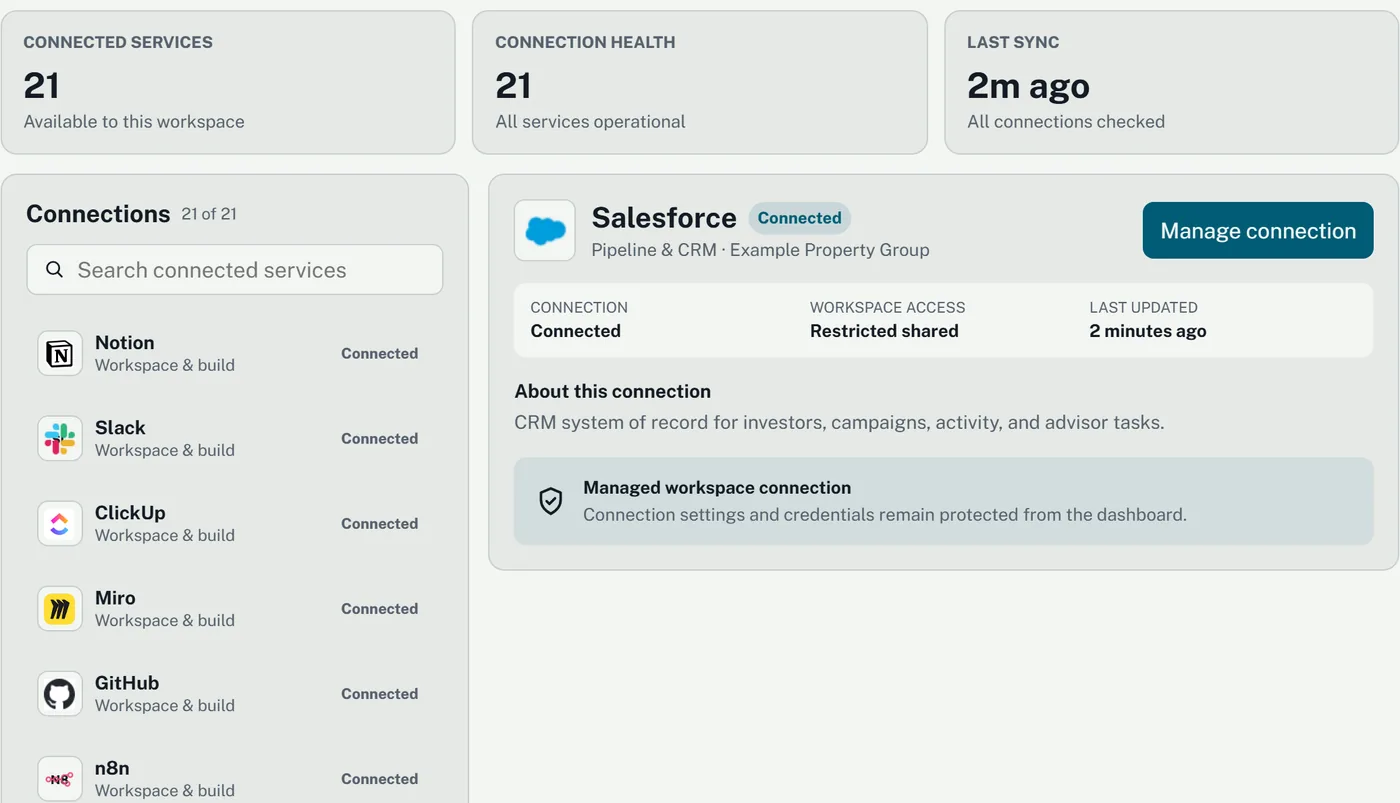
We begin with the systems your chosen workflow needs. For this handoff example, the connection detail shows which Salesforce access the workspace can use and when it was last checked.

  • Choose the systems: connect only the tools and records needed for the selected process.
  • Authorize the access: agree what each connection may read or change; your team grants that access.
  • Handle a failure: identify the affected step, notify its owner, and use the agreed retry or manual fallback.
  • Revoke a connection: withdraw access through the provider or the agreed support process; affected workflows pause until a working path is restored.
Second Mind workspace connected services: counts of connected services and connection health, a searchable list of connections, and the Salesforce connection detail showing workspace access, last update, and a note that connection settings and credentials remain protected from the dashboard. Demo workspace with sample data.
Salesforce connection detail · View full screenshot (opens in a new tab) ↗

What the engagement changes

From knowing AI matters to knowing it works.

  1. 01We know AI matters.
  2. 02We know which workflows are worth changing.
  3. 03Those workflows run under agreed boundaries, with approvals and a visible record, in a workspace our team uses.
  4. 04We can supervise them and verify the value.
Bring us a workflow Prefer a general conversation? Get in touch.